

Notion AI Meeting Notes has gained significant attention since its launch in May 2025. As a Notion user and creator since 2022, I want to explore this feature and decide whether it really makes the process of taking notes easier.
New to Notion? Create your Notion workspace (affiliate link)
Table of Contents
What is Notion AI Meeting Notes?
Notion AI Meeting Notes is a native tool in the Notion workspace that lets you capture audio and save it inside Notion. Notice that you can use it only in the Notion application on the Desktop. This tool is not available in the browser.
To start Notion AI Meeting Notes, type /meet on any Notion page, join a meeting from your Notion Calendar, and from that point on, it listens to your mic and system audio.
Notion AI Meeting Notes can pick up everything from Zoom, Google Meet, YouTube videos, or even your own voice notes. This is not part of any direct integration with any of these platforms. In all cases, it records the audio and helps you summarize and transcribe it.
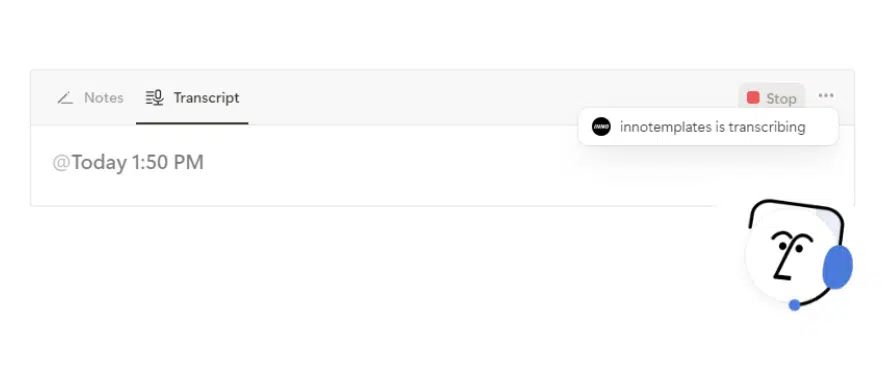
When finished, you click Stop, and Notion will generate a full transcript of what is said in the meeting. While audio recording is in progress, Notes is a separate tab that lets you enter manual notes during the meeting.
My first impression of this feature is that it is lightweight and works well for webinars or 1-1 coaching meetings.
What can Notion AI Meeting Notes?
Techcrunch calls it: another step toward Notion becoming a broader productivity suite that could compete with tech giants like Google and Microsoft. But what exactly can Notion AI Meeting Notes?
Notion AI Meeting Notes adds a transcript of everything said in the meeting. It does not matter whether the meeting was on Zoom, Teams, or Google Meet. In all these cases, it records the audio and helps you summarize and transcribe it.
Its main advantage is that you don’t need to export it anywhere; everything happens on the same Notion page. You can format it there, tag people who were present in the meeting, and link to databases.
Everything is stored in a Notion page. You can later use Notion AI to ask questions about the transcript. You can organize all this in the same system, including tasks, projects, OKRs, and meeting notes. Basically, you can include the content from the meeting and put it under Objective, Task, Plan, etc.
The benefits of using Notion AI Meeting Notes are:
- A setup for Notes, Transcript and Summary. This fits well in a Notion page. You don’t need to open another app. The workflow is naturally integrated in Notion.
- You can tag a member of the workspace by typing @@ and create follow-ups, just as you can on every Notion page. If you are already using a Notion Workspace or a System, you can integrate it into that workspace or system.
I would suggest integrating a button in the database that starts AI Meeting Notes. Customize it to click ‘Record Meeting Notes’ for every meeting in the database. - It works with anything that plays audio: You’re not limited to Zoom or Google Meet. It works because it captures system audio.
- When you are using Notion Calendar, the Notion AI Meeting Notes can start automatically with a meeting page in Notion. In this case, the recording block can be inserted by default. However, you still need to manually hit “Start” and go through the consent flow.
I would suggest Notion AI Meeting Notes to all workspaces in small teams, startups, and small agencies that want to communicate with the client.
- Best for: solo users already working in Notion with a Business-level account
- Not great for: team meetings, speaker tracking.
- Overall: Useful for internal notes, but not a full replacement for a meeting assistant.
If you offer Legal Services, take a look of our Legal Case Management Notion Template.
It is our Best Seller.
What is the price of Notion AI Meeting Notes?
At this time (December 2025), a free trial of Notion AI, including Notion AI Meeting Notes, is available on the free plan and the Plus plan. Beyond the free trial, Notion AI Meeting Notes is included with the Business Plan and Enterprise plans.
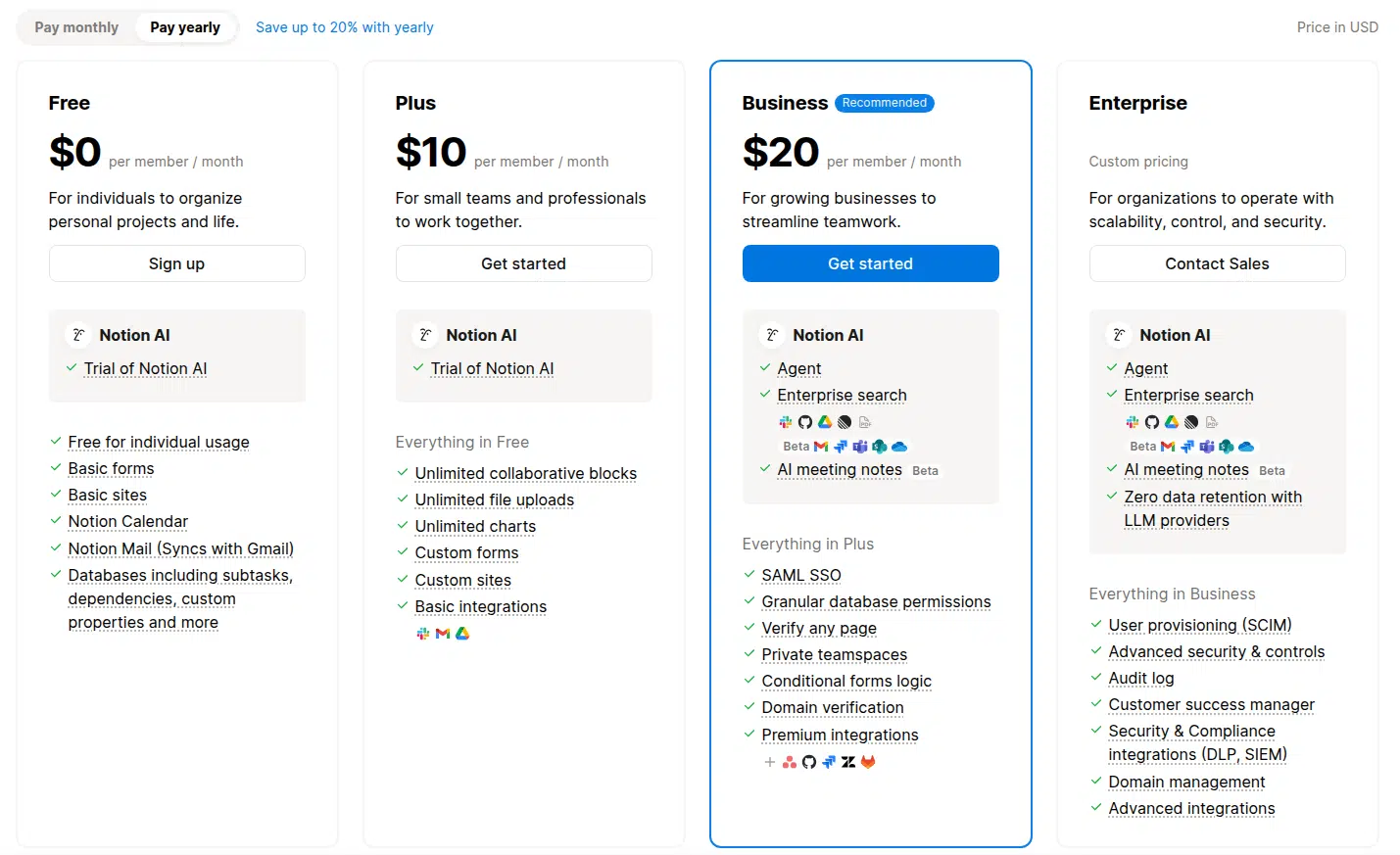
If you are already part of the Notion Business Plan, you can take advantage of this feature. But I would not suggest upgrading to upgrade ot the Business Plan just for this. The private teamspace and the granular database permissions seem to be two crucial reasons to upgrade to the Notion Business Plan.
If your team is already on Notion’s Business plan, this feature is a useful addition. But if you’re considering upgrading just to access AI Meeting Notes, it’s worth pausing.
Privacy and data storage
Before starting every meeting recording, you should consider how to manage consent and data properly. Notion’s documentation warns about legal and regulatory aspects of recording. It highlights clear in-product reminders to obtain authorization before using AI Meeting Notes.
What you should do:
- Before hitting “Start” on the /meet block, verbally ask all participants for consent, or play the consent message included in Notion’s block settings.
- Check permissions: make sure meeting note pages have the correct sharing settings, and confirm who can view the transcript or download the audio.
- If your workspace has data retention policies, set up automatic deletion of transcripts or audio recordings where required.
Some pitfalls of Notion AI Meeting Notes.
As far as we have noticed, there are some cases where Notion AI Meeting Notes is not a suitable option. These are the cases when the meeting has many participants, part of the team or clients. This is because it records and transcribes the voice, but it cannot detect who is speaking right now. Therefore, it does not distinguish between voices or their tones.
Another thing to consider is that Notion AI Meeting Notes does not capture video or screen share. It’s audio only.
As we mentioned above, there is no tone of voice. Therefore, you can’t control the tone of the voice in the meeting note, as it is presented in a neutral form. If you want to add nuance or personality, you need to edit the transcript manually.
The final verdict.
The newest feature of Notion is perfect for solopreneurs, coaches, and freelancers. If your entire business is already part of a Notion setup, the Notion AI Meeting Notes fit very well.
However, if you manage a large team, participate in external calls, or want to know what was discussed, you’ll likely find that this feature isn’t the optimal one.


I truly appreciate your technique of writing a blog. I added it to my bookmark site list and will
Thank you Morgan. Subscribe to our newsletter to get more content like this.